First impressions happen in a heartbeat. In web design, that split second is usually defined by the hero image, which is the bold, high-impact visual sitting at the top of your site.
More than just a pretty picture, a hero image is a strategic asset designed to communicate brand value and drive instant conversions. From a search perspective, these visuals are critical because they directly influence Largest Contentful Paint (LCP), a core metric for ranking in modern generative engines. To truly master the hero section, you must balance stunning aesthetics with technical precision. By optimizing for mobile responsiveness and performance, you ensure your site captures attention while meeting the strict standards of AI-driven search results.
Hero Image in Web Design: A Strategic Guide to First Impressions, UX, and Conversions
A hero image in web design is often the first thing users notice when they land on a website, and first impressions happen fast. Research shows users form an opinion about a website in under 0.05 seconds, making the hero section critical for engagement and trust.
From my experience working on homepage design projects, I have seen how the right hero image can immediately communicate value, while the wrong one can push users away. This guide explains what hero images are, why they matter, and how to use them strategically to improve UX, conversions, and brand identity.
What Is a Hero Image?
A hero image in web design is a large, prominent visual placed at the top of a webpage, usually above the fold. It is designed to capture attention, communicate the core value proposition, and guide users toward a clear call to action (CTA) within the hero section.
Many people confuse a hero image with sliders or random banners. In reality, a website hero image is intentional. It supports visual storytelling and establishes visual hierarchy. The goal is clarity, not clutter.
In UX design terms, the hero image helps orient users. It answers three unspoken questions instantly. Where am I? What does this website offer? What should I do next?
From a UI design perspective, it sets the tone for typography, color usage, spacing, and layout throughout the rest of the page. When done correctly, it becomes the visual foundation of the entire website.
Why Are Hero Images Important in Modern Web Design?
Hero images are important in modern web design because they shape first impressions, communicate brand identity, build trust, and guide user attention. A well-designed hero section improves engagement, supports UX, and helps users understand value instantly.
Website First Impression Psychology
Users decide whether to stay or leave within seconds. A strong hero image creates a positive first impression by combining imagery, messaging, and layout into one focused experience. When the hero section is confusing or generic, bounce rates increase almost immediately.
I have personally seen redesigns where nothing changed except the hero image and headline, yet engagement metrics improved noticeably. That is the power of first impression psychology.
Brand Identity and Trust
A hero image visually introduces your brand. It reflects your tone, values, and positioning. Premium brands tend to use clean compositions, strong typography, and minimal distractions. Budget brands often rely on crowded visuals and stock imagery.
In digital marketing design, trust is currency. A well-designed hero section signals professionalism and credibility before a single paragraph is read.
Supporting UX and Conversion Goals
Hero images guide user attention. They help users understand what matters most on the page. When paired with a strong value proposition and CTA, they directly support website conversion optimization.
For example, ecommerce brands use hero images to highlight flagship products. Service-based businesses use them to communicate outcomes and benefits. Landing page design relies heavily on hero sections to reduce friction and guide action.
What are the key benefits of using a Hero Image in web design?
Hero images help instantly communicate brand value, improve user engagement, guide users toward conversions, and establish visual hierarchy. When used strategically, they create strong first impressions and encourage users to explore and take action.
Instantly Communicates Brand Value
A hero image allows you to communicate your value proposition without relying solely on text. Visual cues such as context, emotion, and scale help users understand what you offer within seconds, especially important for mobile users.
Improves User Engagement and Time on Page
Engaging hero images encourage users to scroll. When users feel visually oriented and emotionally connected, they are more likely to explore deeper sections of the website. This improves engagement metrics that indirectly support SEO and performance.
Supports Conversion-Focused Design
Hero images work best when designed with conversion in mind. By guiding attention toward a CTA button or form, they reduce decision fatigue and help users take the next step confidently.
Strengthens Visual Hierarchy
In graphic design for websites, hierarchy determines how users process information. The hero image sits at the top of this hierarchy, controlling flow, spacing, and emphasis across the page.
What Types of Hero Images Are Used in Web Design?
Web design commonly uses product-focused, lifestyle, brand storytelling, typography-based, illustrative, video, interactive, and minimal hero images. Each type supports different goals such as conversions, storytelling, brand identity, or performance optimization.
Product-Focused Hero Images
Product-focused hero images place the product at the center of attention. Brands like Apple and Sony PlayStation use clean backgrounds, sharp lighting, and minimal text to let the product speak for itself.
This approach works well for ecommerce and product launches. It reinforces product marketing and supports direct conversions.
Lifestyle and Contextual Hero Images
Lifestyle hero images show products or services in real life scenarios. Nike is a strong example, using emotion, movement, and storytelling to connect with users.
These images are effective for visual storytelling and brand building. They help users imagine themselves using the product or service.
Brand Storytelling Hero Images
Some brands use hero images to tell a story rather than show a product. Tommy Hilfiger often blends fashion, culture, and identity into its hero sections, reinforcing brand messaging rather than pushing immediate sales.
This approach works well for long-term brand identity and emotional connection. However, a single hero image cannot tell your complete brand story on its own. Strategic content marketing extends the narrative established in your hero section across blog posts, case studies, and social media, creating a cohesive brand experience that converts visitors into loyal customers over time.
Typography-Based or Text-First Hero Images
In some homepage design strategies, typography replaces imagery altogether. Large headlines, bold fonts, and whitespace become the hero.
This trend works well for SaaS companies and professional services where clarity and messaging matter more than visuals. It also improves performance and accessibility.
Illustrative and Graphic Hero Images
Illustrations offer flexibility and originality. They are often used in UX-driven products and startups to explain abstract ideas.
Tools like Figma and Adobe Photoshop are commonly used to create custom illustrations that align with brand identity and UI design systems.
Video and Animated Hero Images
Video hero images are engaging but risky. While they can increase emotional impact, they can also hurt page speed if not optimized properly.
When used carefully, they enhance visual storytelling. When misused, they damage performance and user experience.
Interactive and 3D Hero Images
Interactive and 3D hero images are part of emerging web design trends. They create immersive experiences but require advanced development and testing.
These are best suited for high-end brands and experimental campaigns, not everyday business websites.
Minimal or Negative Space Hero Images
Minimal hero images rely on whitespace, subtle imagery, and simple messaging. This approach improves readability and reduces cognitive load, especially for mobile users.
How to Optimize Hero Images for Performance and Speed
Hero image optimization directly affects user experience, SEO rankings, and conversion rates. Unoptimized images can increase page load time by 3-5 seconds, which often results in 40-50% higher bounce rates before users even see your content.
Choose the Right File Format
WebP is the recommended format for hero images in modern web design. It provides 25-35% better compression than JPEG while maintaining visual quality. WebP supports transparency like PNG but with significantly smaller file sizes.
For browsers that do not support WebP, use JPEG for photographic hero images and PNG for graphics with transparency. Avoid using uncompressed formats like BMP or TIFF on production websites.
Compress Images Without Losing Quality
Hero images should be compressed to balance quality and performance. Target file sizes:
- Desktop hero images: 150-300 KB maximum
- Mobile hero images: 80-150 KB maximum
Tools like TinyPNG, ImageOptim, or Adobe Photoshop’s “Export for Web” feature help achieve these targets. Test compressed images on actual devices to ensure quality remains acceptable.
Implement Lazy Loading and Progressive Rendering
Lazy loading delays image loading until the image enters the viewport. However, hero images appear above the fold, so traditional lazy loading should not be applied here.
Instead, use priority loading techniques. In HTML, add fetchpriority=”high” to your hero image tag to tell browsers to load it first. Combine this with progressive JPEG encoding so users see a low-resolution preview while the full image loads.
Use Responsive Images with srcset
A single hero image should not be served to all devices. Use the HTML srcset attribute to deliver appropriately sized images:
<img src="hero-desktop.webp"
     srcset="hero-mobile.webp 768w,
             hero-tablet.webp 1024w,
             hero-desktop.webp 1920w"
     alt="Product showcase hero image">
This ensures mobile users do not download unnecessarily large desktop images, which improves load times and reduces data usage.
Leverage CDN and Caching
Content Delivery Networks (CDNs) like Cloudflare, AWS CloudFront, or Fastly distribute your hero images across global servers. This reduces latency by serving images from locations physically closer to users.
Enable browser caching by setting appropriate cache headers so returning visitors do not re-download the same hero image on every visit. A cache duration of 30-90 days is standard for hero images.
What’s the difference between a hero image and other above-the-fold visuals?
A hero image differs from other above-the-fold visuals by focusing on a single message, value proposition, and call to action. Unlike sliders, video backgrounds, or banners, hero images prioritize clarity, user focus, and conversion effectiveness.
To make the differences easier to understand, here is a clear breakdown.
Comparison of Hero Image and Other Above-the-Fold Visuals
| Visual Type | Primary Purpose | Strengths | Weaknesses | Best Use Case |
| Hero Image | Communicate value and drive action | Clear messaging, focused CTA, strong first impression | Requires strategic planning | Homepage design, landing page design |
| Image Slider | Display multiple messages | Shows variety of content | Reduces clarity, users ignore slides | Promotional pages with secondary importance |
| Video Background | Create atmosphere or emotion | High visual impact | Hurts page speed, distracts from message | Brand storytelling when performance allows |
| Static Banner | Decorative or informational | Easy to implement | Often lacks intent and conversions | Temporary announcements |
A true hero image in web design is purpose-driven. It focuses on one primary message, one value proposition, and one call to action. Unlike sliders or banners, it does not compete for attention. Instead, it directs it.
What Are the Most Common Mistakes People Make When Using Hero Images in Web Design?
Common hero image mistakes include using generic stock images, overcrowding the hero section with text, poor contrast and readability, and ignoring conversion intent. These issues reduce clarity, trust, accessibility, and overall website performance.
Using Generic or Irrelevant Stock Images
Stock images that do not reflect your brand or offering weaken credibility. Users instantly recognize generic visuals, which reduces trust and makes your website feel interchangeable with competitors instead of distinctive.
Overloading the Hero Section with Text
Trying to explain everything above the fold overwhelms users. Long paragraphs, multiple CTAs, and excessive messaging reduce clarity. A strong hero section prioritizes focus, not information density.
Poor Contrast and Readability
Text placed over images without proper contrast becomes difficult to read, especially on mobile devices. Accessibility and usability suffer when readability is sacrificed for visual aesthetics.
Ignoring Conversion Intent
Some hero images look beautiful but offer no direction. Without a clear CTA or next step, users are left unsure what to do, which directly hurts website conversion optimization.
How to A/B Test Your Hero Section for Better Conversions
A/B testing hero sections often reveals surprising insights that static analysis cannot predict. Small changes to imagery, headlines, or CTAs can produce 15-30% improvements in conversion rates when tested systematically.
What Elements to Test in Hero Sections
Hero image variations: Test different image types (product-focused vs lifestyle vs minimal) to see which resonates most with your audience. Even subtle changes like background color or subject positioning can affect engagement.
Headline messaging: Test benefit-focused headlines against feature-focused headlines. For example, “Build Websites Faster” (benefit) vs “Drag-and-Drop Website Builder” (feature). Winning headlines often surprise even experienced copywriters.
CTA button copy: Test action-oriented language (“Start Free Trial”) against value-oriented language (“Get My Free Trial”). Also test button colors, sizes, and placement within the hero section.
Text contrast and overlays: Test different text overlay styles (solid color bars, gradient overlays, no overlay with high-contrast images) to find the balance between readability and visual impact.
How to Run Hero Section A/B Tests
Run tests for at least 7-14 days to account for weekly traffic patterns. Shorter tests may produce misleading results, especially if your audience behavior varies by day of week.
Test one element at a time. Testing multiple changes simultaneously makes it impossible to know which change drove results. If you must test multiple elements, use multivariate testing tools designed for that purpose.
Use tools like Google Optimize, VWO, or Optimizely to split traffic evenly between variations. Ensure statistical significance before declaring a winner—typically 95% confidence with at least 100-200 conversions per variation.
Metrics to Track During A/B Tests
Bounce rate: Lower bounce rates suggest better immediate relevance
Time on page: Longer time indicates higher engagement
Scroll depth: Shows if users move past the hero section
Click-through rate on CTA: Direct conversion signal
Conversion rate: Ultimate success metric
Track secondary metrics as well. Sometimes a hero section that reduces bounce rate does not improve conversions, or vice versa. Understanding these relationships helps inform future design decisions.
When to Refresh Your Hero Section
Hero sections should be refreshed every 6-12 months, even if current performance is acceptable. User preferences, design trends, and competitive landscapes change. Regular testing and updates keep your website feeling current and performing optimally.
Seasonal businesses may need to refresh hero sections more frequently to align with product launches, promotions, or changing customer needs throughout the year.
How Hero Images Affect Website Performance and SEO
Hero images affect website performance and SEO by influencing page speed, Core Web Vitals, user engagement signals, accessibility, and long-term optimization costs. Poorly optimized hero sections can increase bounce rates and harm search visibility.
Impact on Page Speed and Core Web Vitals
Large, unoptimized hero images increase load time and negatively affect Core Web Vitals, especially Largest Contentful Paint. Slow hero sections frustrate users and increase bounce rates before content is even consumed.
Influence on User Engagement Signals
Hero images shape how users interact with your website. Clear messaging and fast loading visuals encourage scrolling and interaction, while confusing or slow hero sections lead to early exits and poor engagement metrics.
Accessibility and Semantic SEO Considerations
Proper alt text, responsive sizing, and meaningful imagery improve accessibility and help search engines interpret visual content. Accessible hero sections support inclusive UX design and strengthen overall SEO foundations.
Long-Term Cost and Optimization Impact
Poor hero image decisions often lead to redesigns, performance fixes, and conversion losses. This is why a hero strategy frequently connects to broader discussions around SEO pricing and overall web page design cost, as mistakes made early can become expensive over time.
Understanding why your business should invest in SEO helps you see hero image optimization as part of a larger performance and visibility strategy, not just isolated design work.
Accessibility and WCAG Compliance for Hero Images
Hero images must meet accessibility standards to ensure inclusive user experiences and avoid legal compliance issues. The Web Content Accessibility Guidelines (WCAG) provide clear requirements for hero section design.
Alt text requirements: Every hero image requires descriptive alt text that conveys the image’s purpose and meaning. Avoid generic descriptions like “hero image” or “banner.” Instead, describe what the image shows and its relevance to the page content.
Example: Instead of alt=”hero”, use alt=”Electric mountain bike on forest trail with rider wearing safety gear”
Color contrast ratios: Text overlaid on hero images must meet WCAG contrast requirements:
- WCAG AA (minimum): 4.5:1 ratio for normal text, 3:1 for large text
- WCAG AAA (enhanced): 7:1 ratio for normal text, 4.5:1 for large text
Use tools like WebAIM’s Contrast Checker to verify your text meets these standards against the hero image background.
Keyboard navigation: Hero section CTAs must be accessible via keyboard navigation. Users should be able to tab to buttons and activate them with Enter or Space keys without requiring a mouse.
Screen reader compatibility: Use semantic HTML (<header>, <h1>, <button>) within hero sections so screen readers can properly interpret and announce content structure.
When hero images are purely decorative, use alt=”” (empty alt attribute) or implement them via CSS background images so screen readers skip them. However, most hero images convey meaning and should include descriptive alt text.
Hero Image Dimensions and Technical Specifications
Using incorrect hero image dimensions leads to distorted visuals, poor mobile experiences, and unnecessary performance issues. Following standard specifications ensures your hero section looks professional across all devices.
Recommended Hero Image Dimensions
| Device Type | Recommended Width | Recommended Height | Aspect Ratio | File Size Target |
| Desktop | 1920px | 1080px | 16:9 | 150-300 KB |
| Laptop | 1366px | 768px | 16:9 | 120-200 KB |
| Tablet | 1024px | 768px | 4:3 | 100-180 KB |
| Mobile | 768px | 1024px | 3:4 | 80-150 KB |
These dimensions represent safe maximums. Actual implementations should use responsive techniques to serve appropriate sizes based on viewport width.
Aspect Ratio Considerations
16:9 aspect ratio works best for desktop hero images because it matches most monitor proportions. This ratio provides enough horizontal space for text overlays without feeling cramped.
3:4 or 9:16 aspect ratios work better for mobile hero images. Vertical orientation feels more natural on smartphones and reduces the need for excessive scrolling to see content below the hero section.
Avoid using the same aspect ratio across all devices. A 16:9 desktop hero image forced onto a mobile screen often results in tiny text and poor visual impact.
Resolution and Retina Display Support
Standard displays use 72-96 DPI, but Retina and high-DPI screens require higher resolution images to avoid pixelation. Design hero images at 2x resolution (3840x2160px for desktop), then compress and optimize before deployment.
Serve 2x resolution images only to devices that support them using media queries or srcset attributes. This prevents standard displays from downloading unnecessarily large files.
Safe Zones for Text and CTAs
Not all of your hero image is safe for placing text or buttons. Screen sizes vary, and cropping happens at different viewports.
Desktop safe zone: Center 60-70% of the hero image
Mobile safe zone: Center 50-60% of the hero image
Place critical elements like headlines and CTAs within these zones to ensure visibility across all common screen sizes without awkward cuts or overlaps.
When You Should Not Use a Hero Image
While hero images are powerful, they are not always the right choice. In some cases, using a hero image can actually reduce clarity, harm performance, or distract users from the primary goal of the page.
Content-Heavy or Information-First Websites
Websites such as documentation portals, knowledge bases, or news platforms often prioritize information density over visual impact. In these cases, a large hero image can push critical content below the fold, forcing users to scroll unnecessarily and increasing friction.
For these websites, users arrive with a specific intent to read or find information quickly. Replacing the hero image with a clear headline and navigation often results in better UX and faster task completion.
Conversion Sensitive Landing Pages
Some landing pages are designed for immediate action, such as signing up, booking a call, or completing a purchase. In these scenarios, a large hero image may slow users down or distract them from the form or CTA.
I have seen A/B tests where removing the hero image entirely improved conversions because the value proposition and CTA became instantly visible without visual competition.
Performance and Speed Critical Environments
Websites operating in low bandwidth environments or targeting users with slower devices must prioritize performance. Hero images, especially unoptimized ones, increase load times and hurt Core Web Vitals.
In performance-sensitive projects, reducing image size or replacing the hero image with typography-focused design often leads to better engagement and lower bounce rates.
How to Design an Effective Hero Section Step by Step
Designing a high-performing hero section is not about choosing a beautiful image first. It is about following a structured process that aligns design, messaging, and user intent.
Step 1: Define User Intent and Page Goal
Before selecting any visuals, identify why users are on the page. Are they looking to learn, compare, buy, or contact you? The hero section should directly support that intent.
For example, homepage design often focuses on brand positioning and exploration, while landing page design focuses on a single conversion action. Mixing these goals weakens the hero section.
Step 2: Clarify the Value Proposition
The value proposition should be clear enough to understand within a few seconds. It answers what you offer, who it is for, and why it matters.
Once the value proposition is defined, the hero image should visually reinforce it. If the image does not support the message, it should not be used.
Step 3: Choose the Right Hero Image Type
Select a hero image type that fits the business model. Product-focused images work best for e-commerce. Lifestyle images support emotional storytelling. Typography-based heroes work well for SaaS and professional services.
The wrong image type can confuse users even if the design quality is high.
Step 4: Design the CTA and Visual Flow
The call to action should be visually distinct and positioned where the eye naturally travels. Good hero sections use composition, contrast, and spacing to guide attention from image to headline to CTA.
Avoid using multiple CTAs unless there is a clear primary and secondary action.
Step 5: Test, Measure, and Optimize
Hero sections should never be considered finished. A/B testing different headlines, images, and CTAs often reveals surprising insights.
Small changes in hero sections can lead to significant improvements in website conversion optimization.
Best Tools and Software for Creating Hero Images
The right tools make hero image creation faster, more professional, and more aligned with modern web design standards. Different tools serve different needs depending on skill level, budget, and project requirements.
Professional Design Tools
Adobe Photoshop remains the industry standard for creating high-quality hero images. It offers precise control over layering, effects, color grading, and export settings. Photoshop works best for photographers and designers comfortable with advanced editing workflows.
Figma has become the preferred tool for UI design teams creating hero sections. Its collaborative features allow designers, copywriters, and developers to work together in real time. Figma’s component system makes it easy to test different hero variations before final implementation.
Sketch is another strong option for UI-focused hero design, especially for macOS users. It integrates well with design systems and supports plugins that optimize images automatically for web use.
Accessible Tools for Non-Designers
Canva offers pre-designed hero image templates that small business owners and marketers can customize without design experience. While less flexible than professional tools, Canva helps maintain visual quality when custom design is not feasible.
Pixlr provides a web-based alternative to Photoshop with similar editing capabilities. It works well for quick edits, resizing, and basic optimization when you need to adjust hero images without installing software.
Specialized Optimization Tools
After creating hero images, use optimization tools before uploading:
- TinyPNG / TinyJPG: Browser-based compression without visible quality loss
- ImageOptim (macOS): Batch optimization for multiple hero image variants
- Squoosh (Google): Advanced compression with real-time quality preview
- ShortPixel: WordPress plugin for automatic hero image optimization
Choosing the right tool depends on your workflow, but professional web design projects typically use Figma or Photoshop for creation, then TinyPNG or ImageOptim for optimization before deployment.
How IdeaXperts Helps You Design High-Impact Hero Sections
At IdeaXperts, we start every hero section with strategy. Before choosing images or layouts, we define your audience, goals, and value proposition. This ensures the hero image communicates meaning, not just aesthetics, and aligns with real user intent from the first second.
UX and UI Design Built Around User Behavior
Our web design and development team blends UX design and UI design to create hero sections that guide attention naturally. We focus on visual hierarchy, readability, and interaction patterns so users immediately understand what your website offers and what action to take next without confusion.
Conversion-Focused Headlines and CTAs
A hero image only works when it supports conversions. We design headlines and call-to-action elements that are clear, visible, and persuasive. Every hero section is structured to reduce friction and improve website conversion optimization across homepage and landing page designs.
Performance-Optimized and Responsive Hero Images
We design hero images with performance in mind. Images are optimized for speed, mobile responsiveness, and accessibility without sacrificing quality.
Professional web development services ensure hero sections are implemented with clean code, proper lazy loading attributes, CDN integration, and responsive srcset configurations that work flawlessly across all browsers and devices from launch day forward.
This ensures your hero section loads fast, looks sharp on all devices, and supports long term SEO and UX performance.
Scalable Design That Grows With Your Brand
Our hero sections are built to evolve. As your business, campaigns, or offerings change, your hero design can adapt without requiring a full redesign. This long term approach helps protect your investment and keeps your website aligned with growth goals.
Real-World Examples of Effective Hero Images
Looking at real brands helps understand how theory translates into practice.
Apple: Product Clarity and Minimalism
Apple demonstrates the absolute power of “less is more.” As seen in the visual, the hero section utilizes a pristine white background to eliminate all possible distractions, forcing the eye directly to the product. The headline is simple and conversational, but the true genius lies in the Conversion Rate Optimization (CRO) strategy behind the buttons. They offer two distinct paths: “Learn more” for the researcher and “Shop iPhone” for the ready-to-buy customer. At IdeaXperts, we often recommend this minimalist framework to our startup clients because it significantly reduces cognitive load and creates a frictionless path to purchase for new visitors.
Nike: Lifestyle and Emotional Storytelling
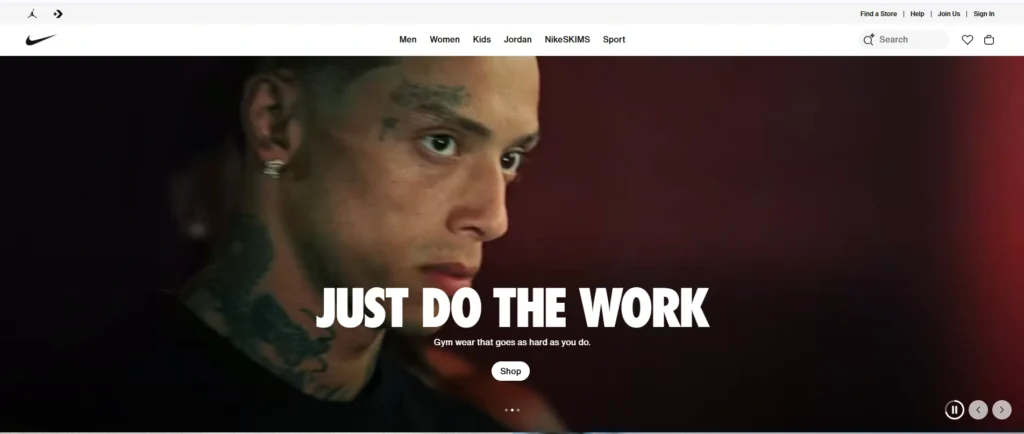
Nike moves away from static product displays to focus entirely on motivation and identity. The hero image features an intense, gritty close-up of an athlete, overlaid with the commanding typography “JUST DO THE WORK.” This approach is a masterclass in emotional branding. They are not just selling gym wear; they are selling the feeling of dedication. The sub-headline “Gym wear that goes as hard as you do” validates the user’s ambition. This technique builds brand loyalty by connecting with the user’s self-image before asking for the sale.
Sony PlayStation: Immersive Visual Experience
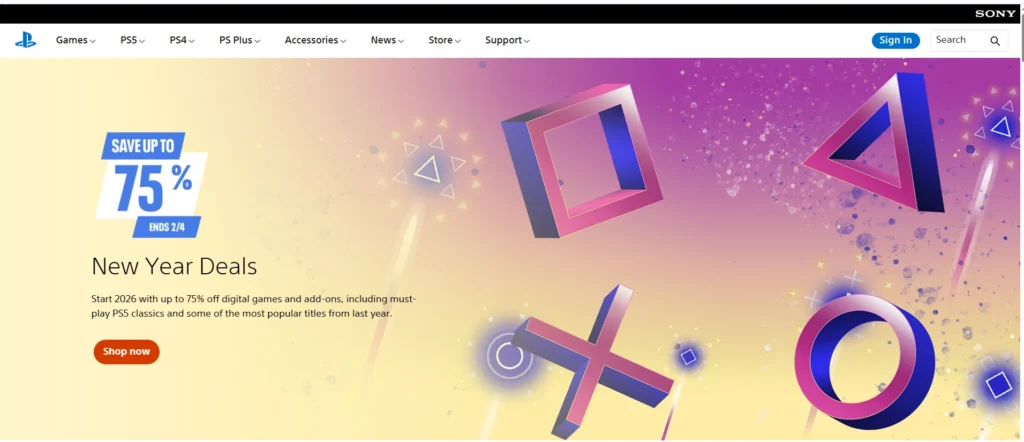
Sony PlayStation creates immediate excitement by using its hero section as a dedicated promotional engine. In this example, they avoid standard gameplay screenshots in favor of 3D, floating controller symbols set against a vibrant, festive gradient to announce their “New Year Deals.” The design hierarchy here is strictly sales-focused. The “75%” savings figure is the largest element on the screen, creating instant value and urgency. The high-contrast orange “Shop now” button stands out sharply against the background, ensuring the user knows exactly where to click to claim the offer.
Service-Based Businesses
Service websites that use outcome-focused hero images often perform better than those showing generic office visuals. Showing results, environments, or customer context improves trust and clarity.
FAQs
What is a hero image in web design?
A hero image in web design is a large, prominent visual placed at the top of a webpage. It supports the hero section by communicating the main value proposition and guiding users toward a clear action.
Is a hero image necessary for every website?
No, not every website needs a hero image. Content-heavy websites, speed-critical pages, or conversion-focused landing pages may perform better without one, depending on user intent and goals.
What is the ideal size for a website hero image?
There is no single ideal size, but hero images should be responsive and optimized for different screen sizes. Large desktop images should scale properly for mobile without hurting performance.
Are hero images bad for page speed?
No, hero images are not bad for page speed if optimized correctly. Poor compression, large file sizes, and incorrect formats are the main causes of performance issues, not hero images themselves.
Can a hero image be a video?
Yes, a hero image can be a video, but it should be used carefully. Videos increase load time and should only be used when they clearly support the message and do not harm usability.
What makes a hero image effective?
An effective hero image supports a clear value proposition, aligns with the headline, loads quickly, and guides users toward a specific call to action without distraction.
Final Thoughts: Using Hero Images Strategically in Web Design
A hero image in web design is not about decoration. It is about direction. When used strategically, hero images strengthen first impressions, support UX design, and improve conversions. When used without intent, they become expensive distractions. The key is clarity, performance, and alignment with real user goals.
Ready to Create a Hero Section That Converts?
A well-designed hero image is just the beginning. Your website deserves a complete design strategy that turns visitors into customers from the moment they land on your homepage.
At Idea Xperts, we don’t just design beautiful hero sections—we build complete web experiences optimized for engagement, conversions, and performance. Our web design and development team has helped 250+ businesses transform their online presence with strategic hero sections, conversion-focused layouts, and mobile-first design.
What You Get:
✓ Custom hero section design aligned with your brand and goals
✓ Performance-optimized images (WebP, lazy loading, CDN integration)
✓ Responsive design that works flawlessly across all devices
✓ A/B testing recommendations to maximize conversions
✓ SEO-friendly implementation with proper alt text and Core Web Vitals optimization
Get a Free Website Design Consultation →
Let’s create a hero section that doesn’t just look good—it delivers measurable results for your business.