Starting a new website sounds exciting. But for most small business owners, it quickly turns into confusion, delays, and unexpected costs. This usually happens because people jump into design before planning. They hire a web team, talk about colors and layouts, and forget the most important part. Preparation.
This is exactly why a website design checklist for clients is so important. At IdeaXperts, we have handled dozens of website projects for small businesses across the USA, and we have seen that projects with clear preparation always finish faster and perform better after launch.
There is often a big gap between what a client thinks a website needs and what a web agency actually requires to build it properly. Clients think, “I just need a website.” Agencies think about user experience, content structure, SEO keywords, forms, tracking, speed, mobile responsiveness, and dozens of technical details that affect results.
When this gap is not filled early, projects suffer from scope creep, repeated revisions, and wasted budget.
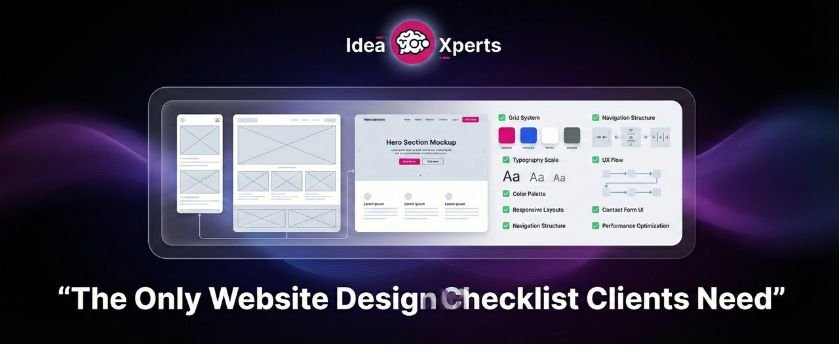
A proper website project checklist and website planning checklist helps you prepare the right information before the project starts. It makes communication clear. It helps your web team understand your business faster. It saves time, money, and frustration for both sides.
Most importantly, it helps you get a website that actually generates leads, bookings, and sales instead of just “looking nice.”
Why You Need a Website Design Checklist Before Hiring an Agency
Before you hire a web design or professional web development agency, you need clarity. Not about design, but about your business, goals, and requirements.
A website design checklist for clients acts like a roadmap. It tells you what to think about before the first meeting with the agency. This is where most people make mistakes. They go into meetings without clear answers, and the project starts with guesswork.
This is where problems begin.
A proper website project checklist helps you:
- Avoid scope creep where new ideas keep adding to cost and timeline
- Set clear expectations for what the website must do
- Help the agency plan the structure, user experience, and content correctly
- Speed up the delivery because fewer revisions are needed
- Get better final results because the project is goal focused
When you also follow a website planning checklist, you start thinking about important things like target audience, SEO keywords, content, forms, and integrations before design even begins.
This level of preparation makes the difference between a website that simply exists and a website that performs.
Step 1 – Define Your Website Goals Clearly
The most important part of your website requirements checklist is defining your real goals.
Saying “I want a professional website” is not enough. Your goals must be measurable and connected to business growth.
You may want your website to:
- Capture leads through forms and calls
- Increase online sales through e commerce integration
- Build brand authority and trust
- Allow customers to book appointments automatically
- Showcase your portfolio and services clearly
- Collect emails for marketing campaigns
If this is a redesign, you must also list current pain points:
- Slow page speed above 2.5 seconds
- Not mobile responsive
- Difficult to update content inside your CMS such as WordPress
- No proper lead capture or call to action
- No tracking through Google Analytics GA4
When you define goals clearly, the entire structure of your website, from layout to content, is planned around achieving those outcomes through professional website development. Our website development process at IdeaXperts always starts with goal mapping before design begins, because design without business goals never delivers results.
Step 2 – Understand Your Target Audience
A website is built for visitors, not for the business owner. These questions to ask before building a website are critical.
You must identify:
- Who will visit your site
- What problems they are trying to solve
- What information they expect to see first
- What action they should take on each page
This is where user experience plays a major role. At IdeaXperts, we map user behavior and visitor intent before creating page layouts so every section guides visitors toward action.
If visitors cannot find answers quickly, they leave.
You must decide early if the primary action is to:
- Call your business
- Fill out a form
- Book a service
- Purchase a product
- Request a quote
When you understand your target audience, your layout, navigation, content flow, and calls to action become powerful. This is also why choosing the right hero section matters, because the first visual your visitors see strongly influences their decision to stay or leave, as explained in our guide on hero image in web design.
This also helps your SEO packages align content with real search intent.
Step 3 – SEO & Keywords You Should Know Beforehand
SEO is not something you add after the website is finished. It begins in the planning stage.
A proper website brief for designers includes your main keywords and the terms customers use to find your services on Google. These SEO keywords help determine:
- Page structure
- Headings and sections
- Internal linking between pages
- Content priorities
Looking at competitors also gives you an idea of what your audience is searching for. SEO directly impacts design, navigation, and content strategy. A good example of this is how content follows the attention-interest-desire-action flow, which we have explained in detail using the AIDA model for SEO.
Our SEO content and web design teams work together from the start so the website is structured for rankings before a single page is designed.
Without this planning, your website may look great but struggle to rank. Early keyword thinking allows your site to be built with SEO in mind from day one using proper SEO content strategy. This is why understanding what goes into optimization helps you see the value behind professional on page SEO pricing and structured implementation.
Step 4 – Audit Your Website’s Existing Content
If you are redesigning, you must follow a detailed website redesign checklist for content.
Do not copy everything from the old site. Instead, perform a content audit:
- Identify pages that still bring value
- Remove outdated or duplicate content
- Update old services and information
- Replace low quality images and weak text
Old websites often carry years of clutter that hurts user experience and SEO performance. Cleaning this before the project starts saves time and improves the final structure of your new website. During redesign projects, IdeaXperts performs a full content audit to remove outdated pages and improve content quality for better SEO performance.
This step ensures your new site is fresh, relevant, and optimized for both users and search engines.
Step 5 – List All Features & Functional Requirements
Your website development checklist must include every feature your website needs. A website is more than pages. It is a functional system.
You should clearly list if you need:
- Lead capture forms and inquiry forms
- Booking or appointment scheduling system
- E commerce store with secure payment gateways
- User login or customer portals
- Automated email notifications to users and staff
- Integration with third party tools such as CRM or marketing platforms
- Social media integration
- Accessibility following WCAG standards
- SSL security for data protection
When these requirements are shared early, your web team can plan the right CMS structure, integrations, security setup, and performance optimization from the beginning.
This avoids last minute requests that delay the project and increase the budget while ensuring your site is built through structured, professional web development practices.
Step 6 – Decide the Technology and Platform
One of the most ignored parts of a website design checklist for clients is choosing the right technology before the project starts. Many business owners say, “Use whatever is best.” But different platforms serve different purposes, and this decision affects your website’s performance, scalability, and ease of management.
Your CMS choice is very important. A Content Management System like WordPress, Shopify, or a custom built platform decides how easily you can update pages, add blogs, manage products, and control your content without depending on a developer every time.
You should think about:
- Do you need a CMS where you can update content yourself
- Do you need e commerce features for selling products
- Do you need custom functionality that requires custom development
- Do you need third party integrations with tools like CRM, email marketing software, or booking systems
You must also decide if your website needs multilingual support for different audiences and whether it must follow WCAG accessibility standards so it is usable for people with disabilities.
This step ensures your web development team selects the right foundation for your website instead of rebuilding things later. We at IdeaXperts recommend platforms based on business goals, scalability, and ease of management so clients stay in control after launch.
Step 7 – Content and Assets You Need to Prepare
Before the design begins, you must prepare all the assets your website will use. This part of your what to prepare before building a website plan saves weeks of delay.
Most projects slow down because clients do not have their content ready.
You should gather:
- High quality images of your business, team, or products
- Videos if you plan to use them on the homepage or service pages
- Your logo in proper formats
- Brand guide with colors and fonts if available
You also need to decide who will handle copywriting. Will you write the content internally, or will the agency provide professional SEO content writing?
Clear content responsibility ensures your website pages, blogs, and service descriptions are written in a way that matches user intent and supports your content packages strategy for ranking on Google.
Step 8 – Domain, Hosting and Security Information
This is a technical step, but it is critical in your website requirements checklist.
You must have access to:
- Your domain registrar account and DNS settings
- Your current hosting account if this is a redesign
- Login details for transferring or updating records
Without this access, your website launch can be delayed even if everything else is ready.
You should also confirm security requirements. Every website must have SSL security for safe browsing. If you collect user data through forms or e commerce, stronger security planning is needed.
Hosting also affects page speed. If your pages load slower than 2.5 seconds, users leave and SEO rankings suffer. Good hosting and proper setup by your web development team ensures fast performance and reliability.
Step 9 – Analytics and Tracking Setup
Many business owners forget this step, but it is very important for measuring results.
You must decide if you already have:
- Google Analytics GA4 account
- Google Tag Manager setup
If yes, you should provide access so tracking continues on the new site. If not, your agency should set this up from the start.
Analytics helps you track:
- How many visitors come to your website
- Which pages they visit
- How many people fill forms or make purchases
- Where your traffic is coming from
This data is essential for improving performance and guiding future SEO content and marketing decisions. Once you start tracking performance, you will also better understand how much SEO costs and why ongoing optimization is necessary after launch.
Step 10 – Social Media and Third Party Integrations
Your website does not work alone. It connects with other platforms your business uses.
You should list all platforms that need integration:
- Facebook and Instagram pages
- CRM or customer management tools
- Email marketing software
- Booking or scheduling tools
Proper social media integration helps users move between platforms easily and builds trust. Third party integrations make your website a working system instead of just an online brochure.
Step 11 – Assign a Point of Contact and Decision Maker
One of the biggest reasons website projects get delayed is the absence of a clear decision maker.
You must assign:
- One main point of contact for communication
- One person who can approve designs, content, and changes
When multiple people give feedback without coordination, revisions increase and timelines suffer. A clear structure speeds up approvals and keeps the project moving smoothly.
Step 12 – Timeline, Budget and Phased Features
The final part of your checklist is planning the project timeline and budget realistically.
You should define:
- Expected launch date
- Available budget for the project
- Features that can be added later as Phase 2
If you are unsure how to plan your budget realistically, this breakdown of how much web design costs will help you set proper expectations. Not everything needs to be built in the first version. Planning phased features allows you to launch faster and improve the website over time.
This step keeps your project practical, organized, and aligned with your business goals while allowing your web development team to deliver efficiently without unnecessary delays.
How IdeaXperts Makes This Entire Process Easy for You
Reading a long website design checklist for clients can feel overwhelming. There are many things to think about before a website project even begins. This is exactly where most small business owners feel stuck. They know they need a website, but they do not know how to prepare for it.
This is where IdeaXperts simplifies everything.
Instead of expecting you to understand technical terms like CMS, integrations, tracking, accessibility, and SEO structure, our team walks you through a simple onboarding process. We ask the right questions, help you define your goals, identify your target audience, and organize your requirements before the design even starts.
If you do not have a website yet, our Build My Website process is designed to take you from zero to a fully functional, high performing website without confusion. We handle planning, design, web development, SEO structure, content flow, and integrations in one place.
If you already have a website that feels outdated, slow, or ineffective, our Fix My Website approach begins with a detailed audit. We review your content, user experience, page speed, mobile responsiveness, forms, and tracking to identify what is hurting your performance.
We also offer a Free Website Audit where our experts analyze your current site and show you exactly what needs improvement before you invest in a redesign.
If you are planning to start a new website or improve your existing one, you can begin with our Free Website Audit and get a clear action plan before making any decision. This helps you move forward with clarity instead of confusion.
You do not have to figure out this checklist alone. If you still feel unsure about where to begin, you can contact our team and we will guide you step by step.
Final Thoughts
A successful website project does not start with design. It starts with preparation.
When you follow a proper website design checklist for clients, you save time, avoid frustration, reduce unnecessary revisions, and get a website that actually supports your business goals. You help your agency understand your vision clearly, and the final result becomes more effective, more organized, and more powerful.
Most website problems are not design problems. They are planning problems. This is also the reason many businesses fail to see results until they understand the real reasons why a business should invest in SEO from the beginning.
If you are planning to build a new website or redesign your existing one, IdeaXperts is here to guide you through every step. From planning and content to web development and SEO structure, we make the process simple, clear, and result focused.
Start with a free audit, understand what your website really needs, and move forward with confidence.
FAQs
What is a website design checklist for clients?
A website design checklist for clients is a preparation guide that helps business owners organize their goals, content, features, and technical requirements before starting a website project with an agency.
Why is planning important before building a website?
Planning ensures the website is built around business goals, target audience, SEO keywords, and required functionality. Without planning, projects face delays, scope creep, and poor results.
What should I prepare before hiring a web design agency?
You should prepare your goals, target audience details, content, brand assets, feature list, domain access, and tracking requirements. This makes the project smoother and faster.
How do I know if my current website needs a redesign?
If your site is slow, not mobile responsive, difficult to update, or not generating leads, it is a sign that you need a redesign and content audit.
Can IdeaXperts help if I have no technical knowledge?
Yes. IdeaXperts guides clients step by step, explains everything in simple terms, and manages the entire process from planning to launch so you do not have to worry about technical details.